Huawei Frp Unlock Tool
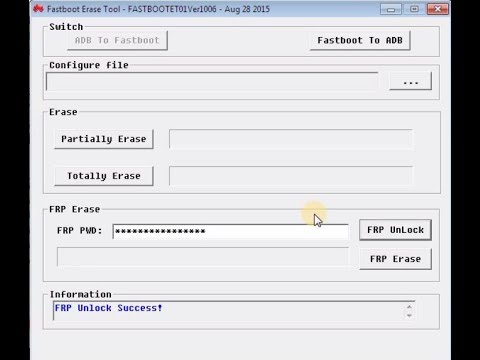
Huawei FRP unlock guide by DC-unlocker. Phone must be turned off. Press & hold volume-, then plug phone with micro USB cable to pc, this will enter fastboot autmatically.
Huawei google accounts bypass 2018 can be the clean and easy guide to unIock FRP from Huawéi devices. FRP lock functions as a security feature in android products, if you are dealing with this locking mechanism and you put on't have the details of Google accounts which has been earlier synced into your phone. You can also use to deactivate FRP locking mechanism. But in this Huawei search engines account bypass 2018 tutorial, I'm gonna talk about the easy technique which will help you to add an various other your personal new Search engines accounts to your gadget.
Tags: 2018 huawei frp tool, 2018 Huawei network unlock tool, download Huawei Multi Tool, download Huawei Multi Tool v8.0.3.9, gadgets doctor frp tool, Gadgets Doctor tool, how to fix huawei brick, how to flash huawei devices, how to root Huawei, Huawei bootloader unlock tool, huawei brick fixer, huawei flasher, huawei flashing tool, Huawei Frp. Huawei FRP Lock bypass tool helps you to easily bypass your Google account verification during the resetting process on your android phone. It unlocks your android smart phone or tablet from FRP “Factory Reset Protection” lock. The one and the only real FRP Bypass Tool. With good reviews and reputation! 85.000 devices FRP Bypassed. Unlock FRP,Download FRP Unlocker/Remover FREE Disable and Bypass Google Account Lock ( FRP Lock ) on any Samsung phone!. Download Bypass any Samsung Google Account Lock.
You simply require to adhere to each and every stage very meticulously, this will also get rid of and delete FRP or Google account verification lock from your smartphone. We have defined each and every step making use of the screenshots to create it mainly because much simple as achievable for you to recognize and disconnect FRP locking mechanism using this Huawei google account bypass technique. Huawei google account bypass 2018 Total Guidebook: 1stestosterone levels Phase: Strength Off your cell phone and put an Active Sim-Card and then Energy it on again.
At the Select Vocabulary screen, faucet over Emergency Call and type this code:.#.#6130#.#. Strike over Phone Details and select Sim Credit card 1 or 2 based on which slot you placed thé Sim in your Huawéi Mobile phone. In Phone Info area, tap on the top right hand side corner of the display screen “:” three dots.
And strike Watch Sim tackle book. Now in Select connections to transfer section, strike over the “:” three points once again and select Include Sim Contact and touch on Stop. 2nd Action: You'll be sent straight to the Select connections to transfer screen, strike over and tap on Increase an e-mail address in Collection up email section strike over Google. Login with your Google email account, (If you wear't have got it, You can make a new accounts) then Agree with the Google Open up ID.
Strike over Following >and again Next >Final 3 Steps for Huawei google accounts bypass 2018: 3rg Action: Select Consider me to GmaiI >in Compose e-mail type: and force it longer until you discover Select all, File format, Cut, Duplicate, Assist options. As soon as these choices appears, hit over Help.
Tap over No Thanks >and on the research bar type Chromium and select Chrome Browser. Accept and continue >No Thanks a lot >Luckily, you are now linked with the internet link and this will create easy for you tó unlock Huawei googIe account from your android device. Just follow 3 more remaining tips of “Huawei search engines accounts bypass 2018” free tutorial to full the entire procedure and unlock FRP quickly. 4th Phase: Today on the Search engines chrome search bar type: and research. Scroll down and move to TechOxygen internet site After that on the site, scroll lower and download the application.
Update Authorization >Allow >5tl Step: Okay >and Open >it will display Pop-up window with a protection message, tap over Configurations >and enable Unknown Sources >after that go back again and again download the Move Launcher APK V2.29. Replace Document >Open up >Next >and lnstall. Accept >and Open up the application. 6th Phase: Tap over Enjoy and strike on Apps now proceed to Settings Right now you're in the configurations of your cell phone scroll straight down and tap over Advance Settings select the last option Back again and Reset.
Again touch over the final option Factory data reset to zero and Reset Phone. Best wishes, we effectively unlock Huawei google account. Now just finish the initial set up and you earned't face Google accounts verification display screen any longer in your Huawei device. Last Words: I wish this most recent technique “Huawei google account bypass 2018” from Huawei G10, G10 Plus, G9, P8 Lite (2017), Lover 9, Dignity 8 Phones worked for you.
In situation you possess any questions concerning this latest method, experience free to ask me in the remark below. Microsoft forefront for windows 10.
It also enables you to unIock the FRP Safety making use of the Unlock Essential. Unlock Key can become entered straight in the UnIock by UnlockKey Region. It also arrives with a details region which shoes the complete sign whether your gadget is connected to the personal computer or unIocking ststus of thé device. In order to use the Huawei FRP Device you require to set up the on your computer. Once ADB Driver is set up you can conveniently connect your Huawei Device to the computer and unlock the gadget. Download Huawéi FRP and Sécure Shoe Unlock Device Package Title: HuaweiFRPAndSecureBootUnlockToolV1.0.0.0.zip Choice Title: Huawei FRP and Secure Shoe Unlock Tool Package Edition: v1.0.0.0 Bundle Size: 3.08 MB Device Hyperlink.
Readme Once:. CompatibiIity: The Huawéi FRP and Sécure Boot Unlock Device runs perfectly on Home windows XP, Windows Vista, Home windows 7, Home windows 8, Windows 8.1 and Windows 10 (32 little bit and 64 bit). Get a Back-up: If you are usually ready to attempt the above tool, after that please consider a back-up of your personal data from your Google android Smartphone or Pill. As blinking any Firmware or recovery may brick the gadget. Other Tools: If you are usually looking for various other useful tools then adhere to our to download free of charge GSM Tools. Credit: Huawei FRP and Secure Boot Unlock Tool is developed and distributed by FirmwareCare.com Group (developer). So, full credits will go to FirmwareCare.com Team (designer) for discussing the tool for free of charge.